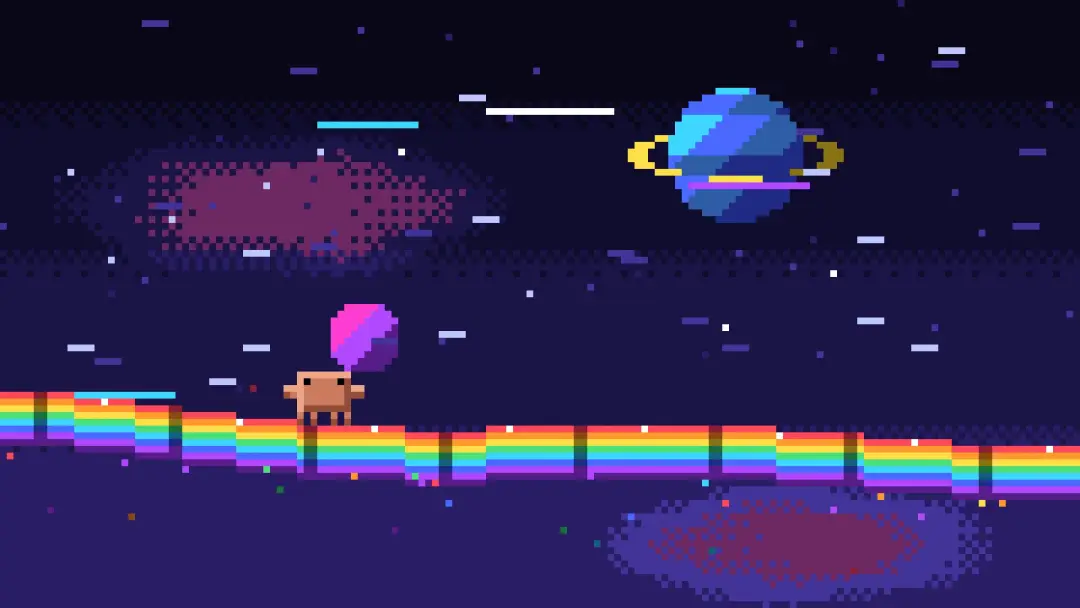
Pixel runner dodging meteors on a rainbow track
An orange pixel character sprints along a rainbow floor in space and dodges meteors and beams in a seamless loop. Claude Opus 5.5 built it in under five minutes from a long Japanese prompt, as one Canvas 2D HTML file.
Prompt
Quoted verbatimSelf-contained
Using Vanilla JavaScript and Canvas 2D, create, as a single self-contained HTML file, an animation in which an orange pixel character sprints at extreme speed across a rainbow floor in outer space and keeps coolly dodging the meteors and beams that attack one after another. Do not use any external assets, libraries, or network requests at all. No operation is required; loop it seamlessly as a demo in which the character keeps dodging automatically.

RENDERING
- Draw everything on an offscreen canvas at a fixed logical resolution of 160x90, and transfer it to a fullscreen display canvas. Use the largest integer multiple that fits in the window as the scale, and place it in the center. Fill the margins with black. Set imageSmoothingEnabled = false, and for CSS specify image-rendering: pixelated.
- Snap all drawing to integer coordinates on the logical canvas. Do not use sub-pixel positions, anti-aliasing, gradients, shadowBlur, or rotated drawing.
- Use a fixed palette of about 32 colors: black through deep navy and purple tones for the space background; 3 steps of orange for the character (the body near #CD7B5E, a bright highlight, and a dark shadow) and black for the eyes; 7 colors for the rainbow floor (red, orange, yellow, green, light blue, blue, and purple) and a dark of each; rock colors and lava colors for the meteors; white, cyan, and magenta for the beams. Every pixel must be taken from a color in this palette.

CHARACTER
- Reproduce the following 12x8 pixel silhouette exactly (1 cell = 1 logical pixel):
- The torso is a rectangle of width 8×height 8 (columns 2-9).
- The arms stick out to the left and right of the torso at width 2×height 2 (columns 0-1 and columns 10-11, rows 2-3).
- The eyes are two black 1x1 pixels, at row 1, column 3 and column 8.
- There are 4 legs on rows 6-7, each of width 1 (columns 2, 4, 7, and 9). Knock out the spaces between the legs with the background color.
- Rather than filling with a single color, put a 1px highlight on the top edge and the left edge, and a 1px shadow color on the bottom edge and the right edge, to give a 16-bit-style sense of volume.
- The run motion is a 4-frame cycle that moves the 4 legs up and down alternately, 2 at a time. Speed the cycle up according to the speed.
- Parameterize the pose (vertical bounce, forward lean, squash & stretch, and the arms up and down). Express squash & stretch only by changing the width and the height by 1-2px in integer pixel units. Interpolate the parameters smoothly, while quantizing to the pixel grid every frame, so that even a 60fps loop looks like pixel-art animation of around 12fps.

RAINBOW FLOOR
- A side-scrolling layout in which the character runs to the right around the left 1/3 of the screen. The floor is a rainbow band made of 7 horizontal stripes (each color 1-2px), extending across the screen and undulating gently (curving up and down on a sine wave).
- Place divider lines at a fixed interval in the floor's vertical direction (dark vertical lines), and scroll them left at high speed according to the speed, to produce a sense of sprinting.
- From the lower edge of the floor, rainbow grains of light spill backward, showing that the floor is floating in space.
- Now and then, place jump platforms (upward curves) and breaks (gaps) on the floor, creating a showcase moment for a jump.

OBSTACLES
- Meteors: 3 sizes, large, medium, and small. Pixel-art rocks (outline + 2 levels of shading + lava-colored cracks) come flying in diagonally from the upper right of the screen. They trail a flame tail that changes from lava color → dark. Dodged meteors do not collide with the floor; they either pass off the screen or shatter into fragments behind.
- Beams: before they appear, display a 1px blinking line (magenta) for about 0.5 seconds as a warning, then fire a beam of thickness 3-5px made of a white core + a cyan outer edge, horizontally or diagonally. While it is firing, the ends tremble with a crackling jitter.
- Obstacles are not random; play predetermined "attack patterns" in order, and design the whole so that it loops over a fixed length of time (example: a single meteor → 3 meteors in a row → a low beam → a high beam → a combination of a beam and a meteor → a large meteor + a floor gap).

DODGE ACTIONS
- Jump: wind up with a squash → leap with a stretch → curl up in the air → squash on landing + rainbow sparks instead of a dust cloud.
- Double jump: pause for an instant in the air, then accelerate again. A rainbow ring 1px thick spreads around the character.
- Sliding: squash the height to nearly half and slide in a low posture, throwing sparks from the surface in contact with the floor.
- Dash dodge: raise the speed greatly for only an instant, and leave 3-4 afterimages behind. The afterimages use the 7 colors of the rainbow in order, and fade in steps toward the dark colors of the palette.
- Assign to each attack pattern the dodge action that looks the coolest for it. Perform the dodge at the last possible moment (a near miss).

STATE MACHINE
- For each attack pattern, repeat RUN (normal sprint) → WARN (warning display; move the eyes 1px so the character looks ahead for an instant) → DODGE (dodge action) → NEAR_MISS (presentation) → return to RUN.
- At the end of the loop, insert BOOST (full-power acceleration) → WARP (the whole screen flashes white → rainbow for an instant), and have it lead naturally, just as it is, into the RUN at the start.
- Apply easing to the pose and camera parameters between keyframes.

CAMERA WORK
- Treat the camera as an integer offset in logical coordinates. Do not use zoom or rotation; express it only with movement of position and with shake.
- Follow: follow the character's vertical movement with a lag and with damping, and on a jump rise a little late.
- Look-ahead: the higher the speed, the more the camera leads by several px in the direction of travel, so that the character is pushed toward the left of the screen, producing a sense of acceleration.
- Hit stop: at the instant of a near miss, stop everything for only 3-4 frames, then slow motion for about 0.3 seconds (by thinning out the update steps), then return to normal speed.
- Shake: when a large meteor passes, or when a beam begins firing, shake the screen by 1-2px. Read the shake from a fixed pattern array, and do not use random numbers.
- During BOOST, lower the camera slightly and increase the area the floor occupies, to emphasize the sense of speed.

EFFECTS THAT CREATE A SENSE OF SPRINTING
- Multi-layer parallax: 3 layers, distant stars (1px dots that barely move), midground stars (that stretch sideways into lines of 2-6px according to the speed), and foreground speed lines (bright-colored horizontal lines that cross the screen at high speed).
- Make the number and the length of the speed lines proportional to the speed, and make them maximum during BOOST.
- Place 1-2 large planets or nebulae in the background as pixel art, and scroll them extremely slowly, to produce a sense of scale.
- On a near miss, outline the character with 1px of white, and light for an instant only the side nearer the meteor or the beam.
- The sparks of landing, sliding, and dashing, the tails of meteors, the fragments, and the grains of light that spill from the floor are all handled by the same particle system.

PARTICLE SYSTEM
- An allocation-free particle system that uses a pool: allocate in advance and reuse.
- Each particle has, per kind, a color-transition table (a sequence of palette indices), and changes color in steps according to its lifetime until it vanishes (example: sparks go white → yellow → orange → dark; afterimages go rainbow color → dark).
- When drawing, snap particle positions to the grid.
- Update with a fixed 60Hz timestep, and draw with rAF. Object creation inside the loop must be zero (including creation of arrays, closures, and string concatenation).

SCENE
- The background is deep space: stepped bands from black to navy (express the boundaries between colors with dithering), twinkling stars, and distant planets.
- Make the difference in brightness clear, so the colors of the character, the obstacles, and the floor are not buried in the background. However noisy the screen becomes, the character's silhouette must be readable at a glance.

QUALITY STANDARD
- Pixels must be crisp at any window size, the loop must not break, 60fps must be stable, and the silhouette must be easy to read.
- It must look like the demo screen of a polished action game from the 16-bit era, not like vector shapes scaled down.
- The three things "fast", "dodged at the last moment", and "cool" must come across on every dodge.
Translated from the Japanese original.Prompt source
Details
- Model
- Claude Opus 5.5
- Type
- Video
- Iterations
- Not stated
- Posted
- Sep 22, 2026
Sources
- X@riku720720https://x.com/riku720720/status/2102515055116063144Sep 22, 2026 · 1,085 likes